
Executive Summary Email (Managers' Recap)
The Executive Summary Email is a weekly digest sent to managers and stakeholders by Spotlight.ai. It provides a high-level, non-technical overview of their team's top accounts — including AI-generated meeting summaries, deal progress, MEDDICC status, and next steps — all in a single email delivered every Friday afternoon.
Who receives this email?
The email is sent to managers and stakeholders configured at the tenant level. Each recipient receives a personalized recap covering the top accounts across all teams they manage.
Individual users can opt in or out of receiving this email from their user profile in Spotlight.ai.
For the manager to receive this email, they must have a Supervisor profile in Spotlight.ai.
When it is sent
The email is delivered every Friday afternoon EST. Admins can configure the send schedule at the tenant level.
Which accounts are included
Spotlight.ai applies the following logic to determine which accounts appear in the email:
- Only accounts where at least one meeting took place in the past week
- From those, the top n accounts by aggregated opportunity deal size that have an opportunity closing within the next x days
- Default settings: top 5 accounts (n) closing within 90 days (x) — both configurable by an admin
- Accounts are ranked by total aggregated opportunity amount in descending order (e.g., an account with $900K in opportunities appears before one with $480K)
- Each account can show multiple opportunities
What is in each email
Header and opening
Each email begins with:
- Email title and week date range
- Manager name
- Team name and number of reps
Per-opportunity detail
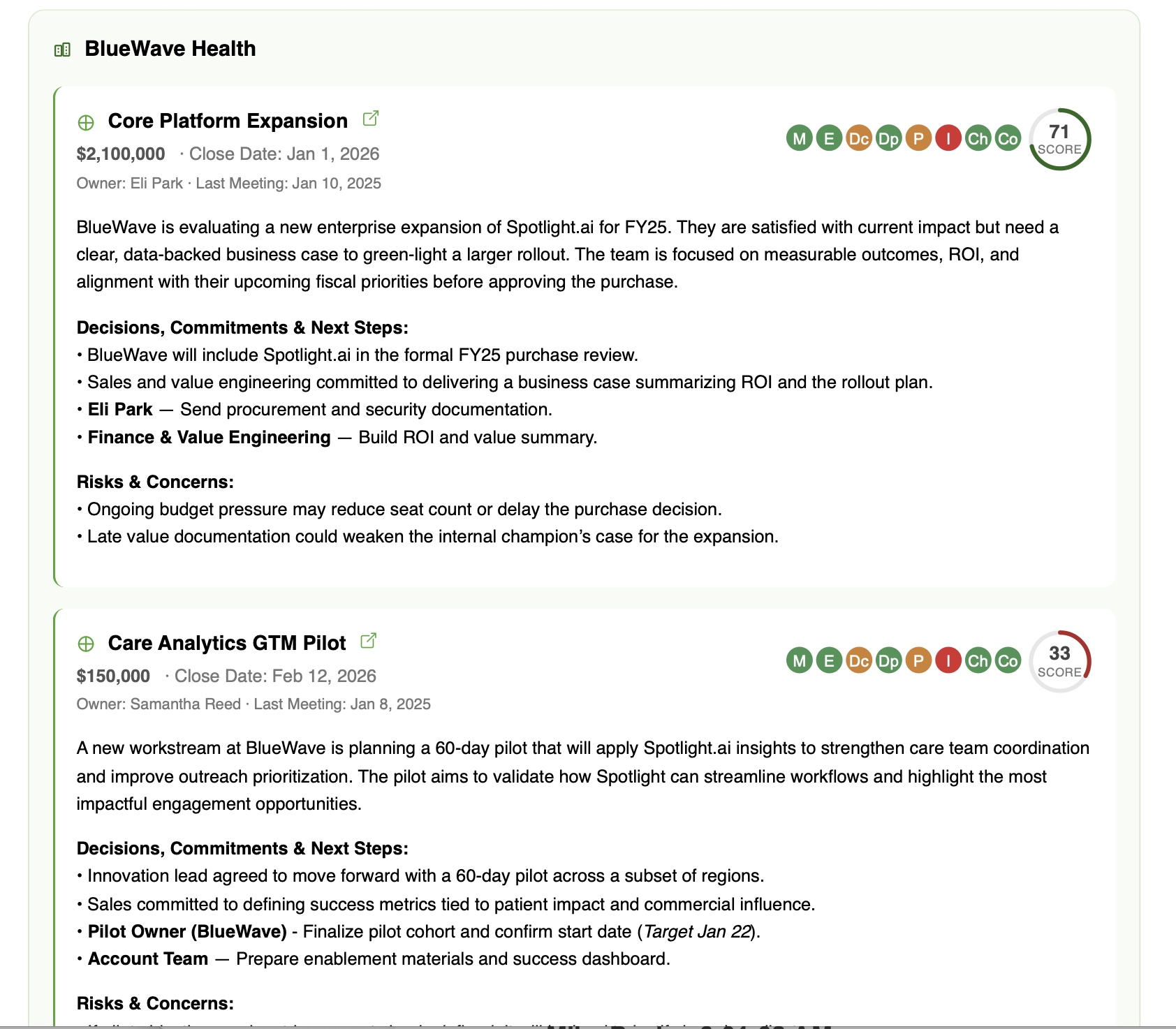
For each opportunity, the email includes:
- Open in CRM button: A direct link to the opportunity in Salesforce or Spotlight.ai (based on your tenant's configuration)
- MEDDICC status: A visual indicator showing current MEDDICC completion
- Spotlight score
- Owner, close date, and deal amount
- Meeting summary: 2-3 AI-generated sentences covering what was discussed in the most recent meeting that week, focused only on deal-relevant content
- Decisions, Commitments and Next Steps: Key decisions made and clear tasks with owners and deadlines
- Risks and Concerns: Issues that may need attention from the manager or team
Opting in or out
Please reach out to your Spotlight.ai admin to enable this feature for the managers in your organization.
Admin configuration
Admins can configure the following at the tenant level:
- Send schedule: When the email is delivered
- Number of top accounts (n): How many accounts to include per email (default: 5)
- Closing window (x days): Only include opportunities closing within this number of days (default: 90)
- CRM link behavior: Whether opportunity links open in Salesforce or Spotlight.ai
- Recipients: Which managers and stakeholders receive the email